
See which post, ad or link a lead came from
Connect your website once. A small script records visits after consent, tracked links carry a signed reference from the click to the form, and your own form or calculator can send the lead from the server. Each lead then shows what it touched before it arrived.
Works on any site where you can paste two lines before </head>, and without them if your server sends the lead.
Four ways in, one event log
Use one or all of them. Everything lands in the same log, where the same event sent twice is stored once.
| Way in | What it records | Use it for |
|---|---|---|
| The site script | Page views, a form being started, and the lead your form hands it with hms('lead', …). |
Your own website, when you can add two lines to it. |
| A tracked link | The click. It then forwards the visitor with campaign parameters and a signed reference. | Posts, ads, emails and the link in your bio. |
| A signed webhook | A lead from your server, and later what became of it: qualified, a sale with its amount, a refund. | A form or calculator you already have. Nothing on the page changes. |
| The API | The same events, one at a time or in a batch, with a key that may write events. | Your own system. API documentation. |
A browser can report a visit and a lead it submitted. It can never report a qualification or a sale: those come from a person, a signed webhook or a key.
A script that asks nothing of the device
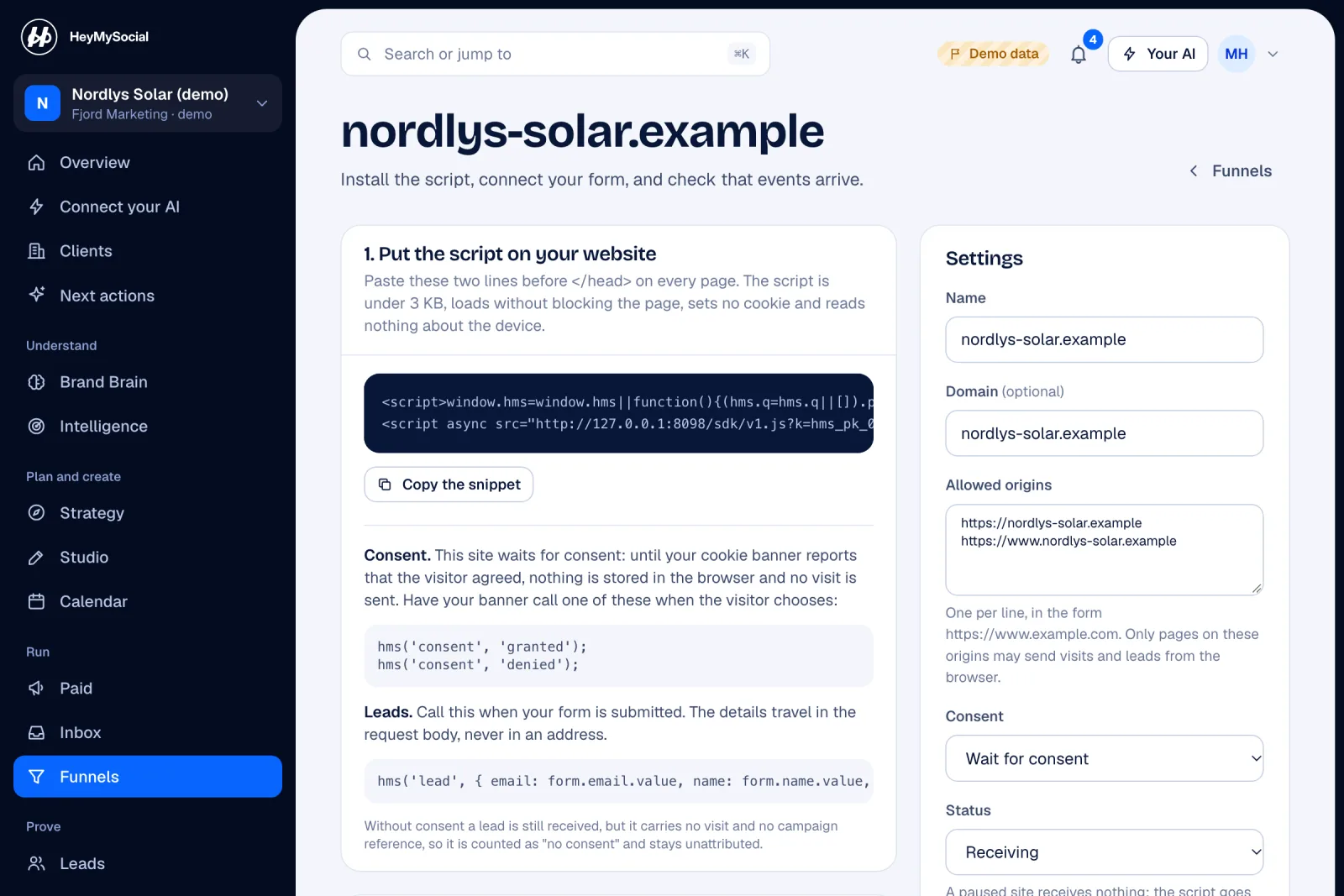
The script is under 3 KB, loads without blocking the page and depends on nothing else. You choose how each site treats consent when you add it, and you can change it later.
Wait for consent is the default. Until your cookie banner calls hms('consent', 'granted'), nothing is stored in the browser and no visit is sent. If the visitor says no, nothing ever is. Run until consent is denied is for places where the law lets you measure without asking first.
A lead the visitor submits is always sent, because they asked to be contacted. Without consent it carries no visit and no campaign reference, so it stays unattributed rather than being guessed at.
- Only pages on the origins you allow may send visits and leads from the browser.
-
A single page can be made stricter with
data-consent="required", never looser. - A paused site receives nothing: the script goes quiet and the webhook address answers "not found".
No cookie. No fingerprint. By default, nothing stored before consent.
The script never reads the user agent, screen, fonts or any other trait of the device. It keeps one random session key in the browser's local storage: after consent on a site that waits for consent, from the first visit on a site set to run until consent is denied. The key is removed when consent is denied. An ad platform's click id is kept only with consent, and only as a hash. Names, email addresses and form answers never enter the event log and are never put in an address.
Tracked links that remember the click without a cookie
A tracked link is a short address you use in a post, an ad or an email instead of the plain one. It counts the click and forwards the visitor to your page with your campaign parameters and a signed, opaque reference. When your form sends the lead, the reference comes back with it, and the lead is tied to that click.
Create one under Funnels, then Tracked links: the destination, a name for reports, where it will be used, and the campaign or post it belongs to. Leave the UTM fields empty and the medium follows the channel, while the campaign travels as a reference code rather than its name.
- Link previews and crawlers are forwarded but not counted. Clicks are clicks, not people.
- A destination or parameter that contains an email address is refused.
- An archived link stops counting and still forwards, so old posts keep working.
- Your assistant can change where a link leads without changing its short address.
A webhook your server signs
For a form you already have, your server posts the lead to the site's own address. Field names and a signing sample.
Signed
Each request carries X-HMS-Signature: an HMAC-SHA256 of the timestamp and the raw body, made with the site's signing secret. A wrong signature is refused and recorded.
Fresh
A request older than 5 minutes is refused, and so is the exact same request sent a second time. A captured request cannot be played back later.
Safe to retry
Sign a retry with a new timestamp and it is accepted. Events it repeats are answered as duplicates and change nothing.
Kept on receipt
A receipt is written before anything is processed. The accepted payload is kept for 14 days with personal details removed; a refused request is recorded without its content.
The whole journey
The same address takes what happens later: lead_qualified, sale_won with an amount, sale_refunded. Each names the lead by your own id.
A secret shown once
The signing secret is shown when the site is created or rotated, then stored encrypted. Rotating it makes the old one stop at once.
Install it, then watch the test arrive
Connecting a website is a manager's job in the workspace. The whole thing takes a few minutes.
-
1
Add the website
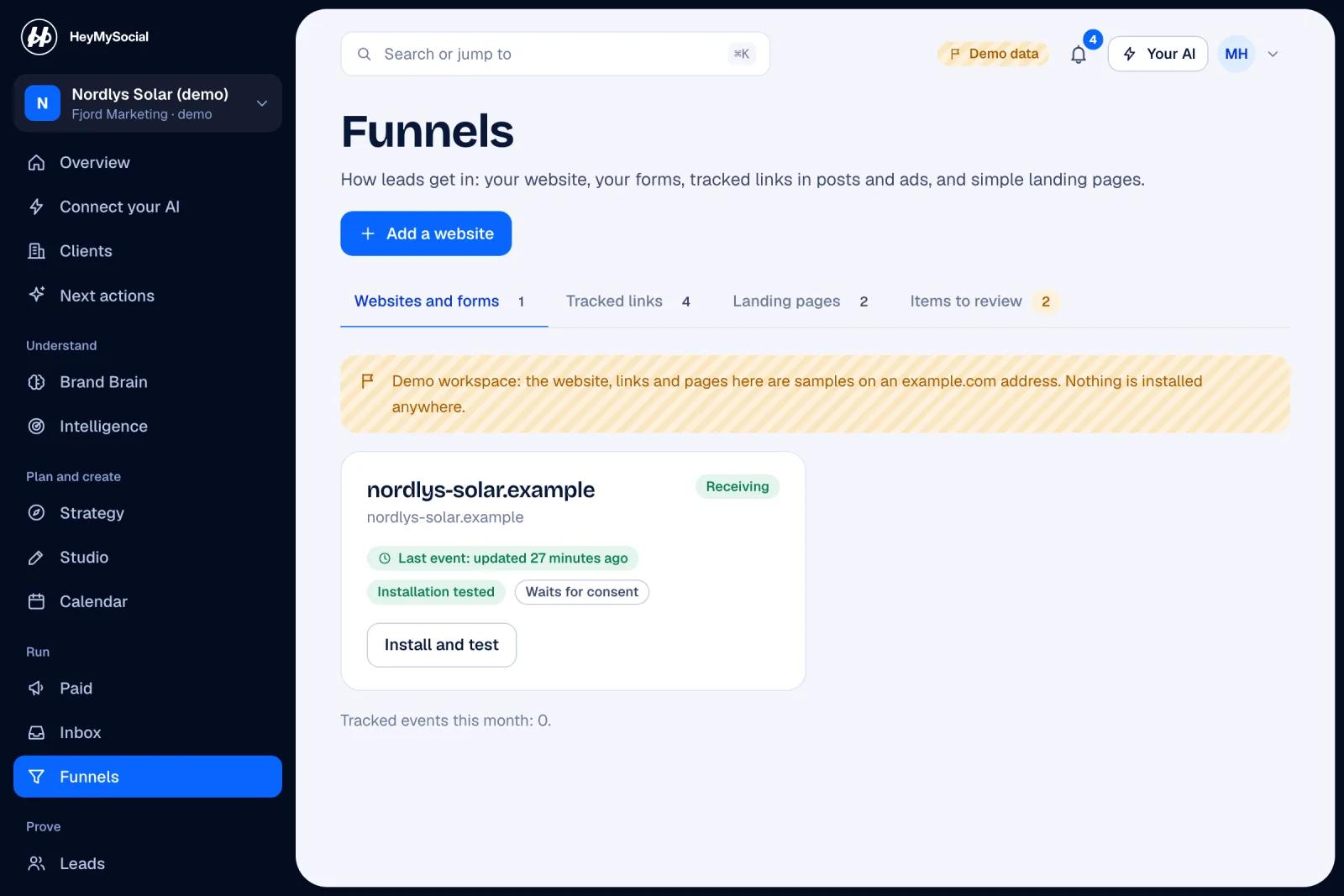
Under Funnels, Websites and forms, choose Add a website. Give it a name, the domain and the consent mode.
-
2
Paste two lines
Copy the snippet from the site's page and paste it before
</head>on every page. -
3
Connect your banner
Have your cookie banner call
hms('consent', 'granted')orhms('consent', 'denied')when the visitor chooses. -
4
Send a test from your site
Open your site with
?hms_test=1on the address. The event appears on the site's page, labelled "Test: created no lead", and the site is marked Installation tested.
What your assistant can do with tracking
It can register your website and hand you the snippet with install steps, make and change tracked links, and check whether events arrive. The signing secret is never returned to it: the reply names the page where a person copies or rotates it.
create_tracking_link
Create a tracked link
get_landing_page
Get a landing page
list_landing_pages
List landing pages
list_tracking_links
List tracked links
manage_tracking_links
Change, archive or restore a tracked link
manage_tracking_sites
Set up website tracking
request_landing_page_publication
Ask a person to publish a landing page
save_landing_page
Save a landing page draft
Questions about tracking
Does it set a cookie?
What happens to a lead from someone who declined tracking?
I cannot add a script to my site. Can I still use it?
What happens when something arrives that cannot be matched?
Is there a limit on events?
How do I know the installation really works?
Keep reading
Connect your website and send the first test
The demo workspace shows what a connected site, its links and its leads look like before you install anything.