
Run it from the assistant you already use
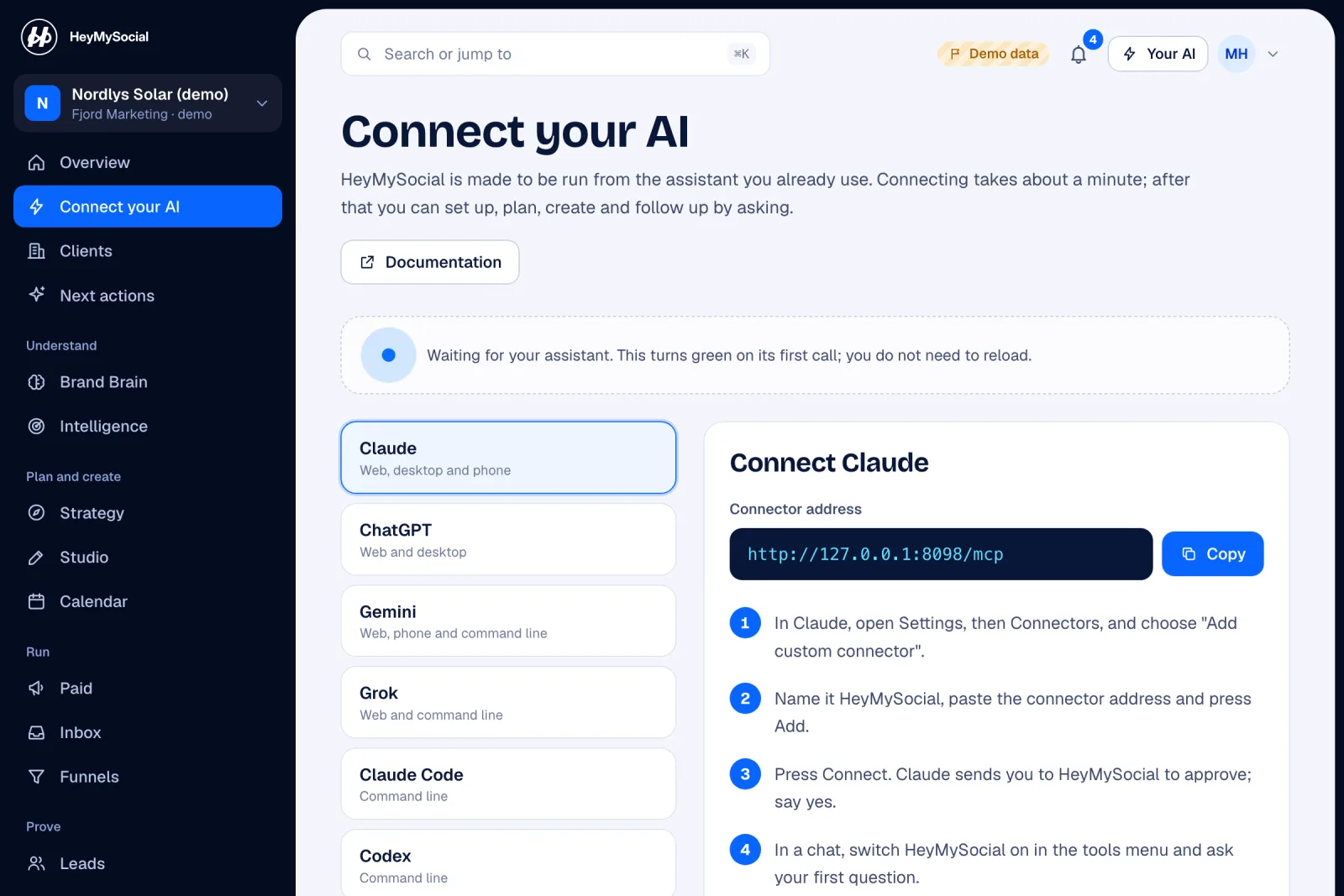
Connect your own assistant to your workspace in about a minute. It reads your brand and your results, builds whole campaigns with posts and graphics, and hands you a link to approve. HeyMySocial runs no AI model of its own.
Works with anything that speaks MCP. See below for what has been tested with each assistant.
Three posts are drafted from your approved facts. They wait for you here: review link
499 kr.
Winter is hard on a bike. Our spring service covers gears, brakes and a full clean, done while you are at work.
Tuesday 09:00, Europe/Copenhagen
Connected in about a minute
-
1
Paste one address
Add
https://heymysocial.com/mcpas a connector in your assistant. Command-line assistants get one ready command with a personal key instead. -
2
Approve the sign-in
Your assistant sends you to HeyMySocial. You see what it may do and say yes. It then works as you, with your role and nothing more.
-
3
Ask your first question
The Connect your AI screen turns green on the first call. A good start: "Set up my HeyMySocial workspace with me, one step at a time."
The whole job, not a chat on the side
The assistant does not paste text into a box for you. It works in the workspace itself: it saves your facts and offers for you to review, records what you tell it about competitors, builds a campaign with its strategy, posts, graphics and tracked links, and reads what the last one led to.
A built-in playbook tells it the order to work in and what it must not conclude from thin data, and four ready prompts start the common jobs: setting up, building a campaign, planning next week and explaining last month.
- 126 tools. 64 are listed when the assistant connects; it finds the rest by searching.
- Every tool says whether it reads, changes, removes or reaches outside, so your assistant knows when to ask you.
- Each call counts against your plan's monthly assistant calls. Nothing is billed on top.
It cannot publish, send or spend. That stays with you.
A post, a message and a budget change are approved by a person in the app, for that exact text, picture, channel and time. No argument an assistant can pass stands in for it. The one thing an assistant can put outside on its own is a link you asked it for, to a shared report or a lead's status, and you can revoke it.
One rule about going out
When the assistant has a post ready, it asks for approval and gets a review link back. It gives you the link. You open it, see exactly what will go out and where, and approve or ask for changes.
Only after that can the assistant put the post on the schedule. If anyone edits the post in between, the approval no longer covers it and the assistant is refused until you have looked again.
Decisions that stay inside the workspace, such as accepting a fact or a strategy, are recorded only when the assistant states that you said yes in the conversation.
What it can call
A sample from three of the thirteen groups. Each tool has its own page with arguments and behaviour.
create_workspace
Create a workspace
get_started
Get started
list_tasks
What needs a person
update_workspace
Update workspace basics
whoami
Who am I
build_campaign
Build a whole campaign as drafts
decide_strategy
Send a strategy for review, approve it or return it to draft
get_campaign
Get a campaign in full
get_strategy
Get a strategy brief
list_campaigns
List campaigns
manage_campaigns
Create, change or archive a campaign
manage_hypotheses
List, add, change or remove hypotheses
save_strategy_draft
Save a strategy draft
create_creative
Create a creative
get_approval
Get an approval
get_content
Get one content item
import_images
Import images from links
list_approvals
List approvals
What has been tested, plainly
We ran the whole job with real assistants against the live service and wrote down what happened.
| Assistant | How it connects | Whole job done with it | In the assistant's own app |
|---|---|---|---|
| Claude | Sign-in, or a key in Claude Code | Full run with Claude Code, twice. | Sign-in flow checked with a script that plays the app; adding it by hand in the app has not been done by us yet. |
| ChatGPT | Sign-in, or a key in Codex | Full run with Codex, the command line that uses ChatGPT's model. | Sign-in flow checked with a script that plays the app; adding it by hand in the app has not been done by us yet. |
| Grok | Sign-in, or a key in the Grok command line | Full run with the Grok command line. | Sign-in flow checked with a script that plays the app; adding it by hand in the app has not been done by us yet. |
| Gemini | Sign-in in the Gemini app, or a key in Antigravity | Not run with a Gemini model yet. Google's command line connected and listed the tools. | Sign-in flow checked with a script that plays the app; adding it by hand in the app has not been done by us yet. |
| Cursor / VS Code | A key in the editor's settings, or sign-in | No full run yet. | Sign-in flow checked with a script for the address VS Code uses; not tried in an editor. |
As tested on November 24, 2026 against the live service. "Whole job" means from an empty workspace to a scheduled, measured campaign using only the tools.
What stays with you
Approval
An assistant can request an approval and read its state. It can never give one, for content or for a budget.
Your role
The assistant acts as the person who connected it. What that person may not do in the app, the assistant may not do either.
Secrets
Your password, your keys and your connections' credentials are never returned to an assistant. The only channel it can connect is the practice channel.
The off switch
Disconnect an assistant or revoke a key at any time from Connect your AI. An assistant that signed in can also be disconnected under Account and security. It stops at once.
The record
What an assistant changes is written to the audit log with the person it acted for.
Your data
HeyMySocial sends nothing to an AI provider. Your assistant reads what you let it read, through your own account with its maker.
Questions about the assistant connection
Do I need a paid plan with my assistant's maker?
Can I use HeyMySocial without an assistant?
Can several people connect their own assistants?
What does the assistant see of my leads?
Is there a limit on calls?
Keep reading
Connect yours and ask it to set up your workspace
The trial includes 2,000 assistant calls, and you can add the demo workspace to try them on.