
Suggestions that show their evidence and wait for your decision
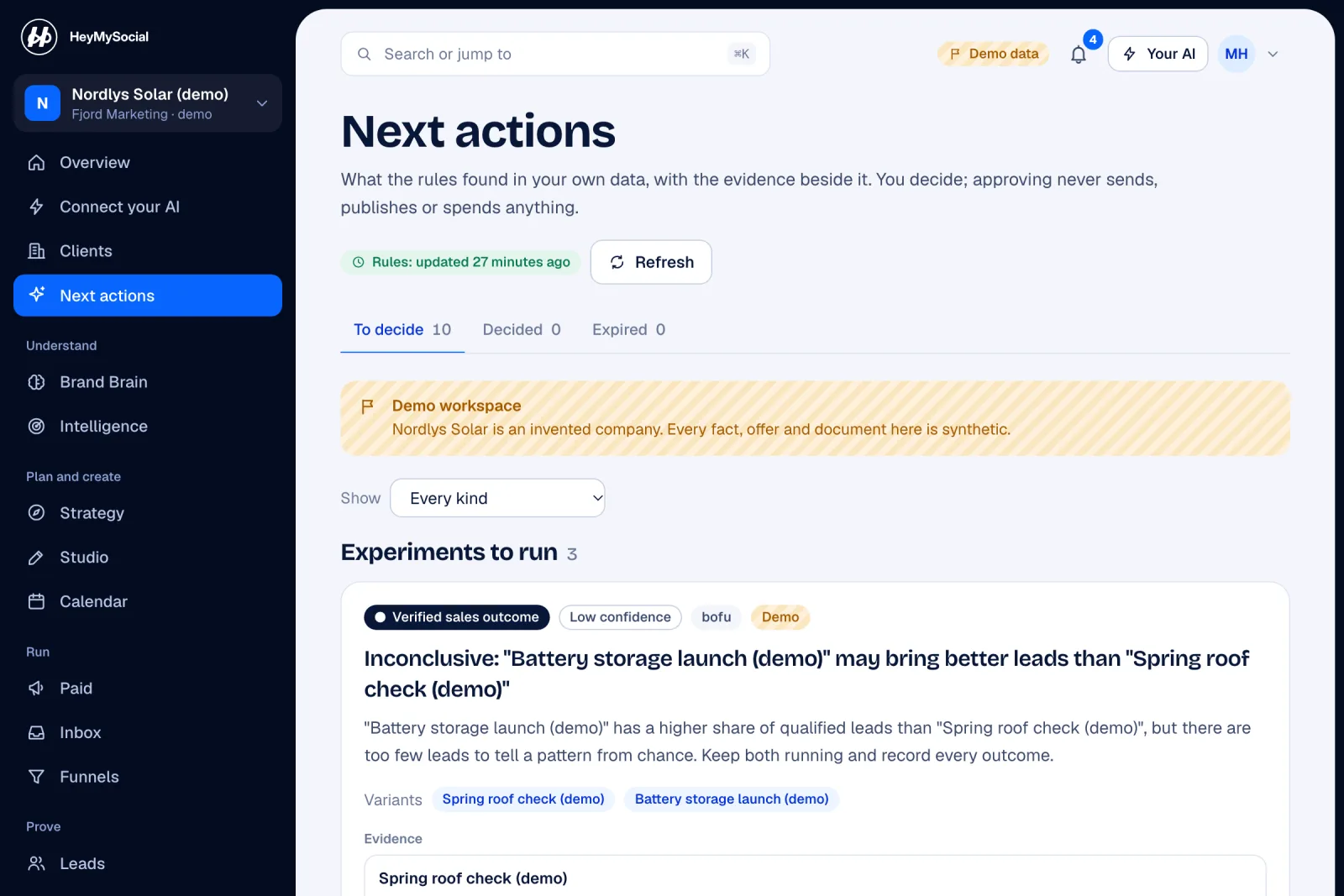
Next actions is where a round of work turns into the next one. A set of fixed rules reads what is in your workspace (posts, leads, sales, spend, research notes, connections) and proposes what to repeat, what to test, what to fix and who is waiting. You approve, edit or reject each one.
Approving a next action never sends, publishes or spends anything.
Fixed rules, not a model.
HeyMySocial runs no AI model. Each rule is a written check with a name and a version, and every card it produces says which rule that was and what it compared. The same data gives the same card every time. For open-ended thinking, your own assistant can read these findings and build on them.
What is on a card
A card is a proposal with its reasoning attached. At the top: the evidence tier, a confidence level and, where it applies, the funnel stage. Then the title and the hypothesis in plain words.
Under Evidence sit the things the rule looked at, as links you can open: a campaign with its counts, a post, a research note, a brand fact. Each says when it was observed and which inputs were missing. If one has since been deleted, the card says "No longer on file" rather than pretending.
- Data window: the dates the finding covers, or "Current state, no time window".
- What is uncertain: what the rule could not know. A finding built on a market signal must state at least one.
- Decision rule: how you will tell whether it worked.
- How this was worked out: the rule's description, its key and version, and the date it was proposed.
Three kinds of evidence, never mixed
The chip on each card says what the finding rests on. A finding with nothing to point at must carry the label "No evidence" rather than borrow a stronger one.
Seen in public or authorized sources. It shows what others publish, not whether it works for them.
Measured in this workspace: engagement, clicks or lead outcomes.
Backed by recorded sales in this workspace.
What the rules look at
The rules are part of the product and the same in every workspace. Cards are grouped by what they ask of you: experiments to run, content to make, budget to reconsider, things to follow up and data to fix first.
| Area | What a rule looks for | What it does on thin data |
|---|---|---|
| Brand Brain | A profile that is incomplete or not approved, facts that are unreviewed, in conflict or about to expire, and no approved offer inside its dates. | Reports the gap as it is. These are checks, not estimates. |
| Content and calendar | Content that has waited days for approval, an empty week ahead, and posts whose engagement rate is well above the median of the same channel. | Stays silent about what worked until enough posts on the channel have been measured. |
| Research | The same hook type or topic recurring in your saved ideas across several sources and weeks, proposed as an experiment. | Never says the pattern worked for anyone. A market signal cannot carry high confidence. |
| Leads and results | New leads waiting past your follow-up time, older leads with no outcome, low attribution coverage, and campaigns compared on how many of their leads qualify and are won. | Reports a comparison as inconclusive when the samples are small. |
| Paid | Campaigns that look cheap per lead and expensive per qualified lead or sale, paid results that are missing, stale or not linked to a campaign, and experiments whose comparison window has closed. | Speaks only when both campaigns pass the minimum sample, using leads old enough to have an outcome. |
| Inbox, connections and plan | Conversations where the other person has waited more than a day, a connection that needs reconnecting, CRM records waiting for a decision, and a monthly allowance that is nearly used. | Reports the state as it is. |
You decide, and approving starts nothing on its own
A workspace manager or a publisher decides. Everyone who can draft content can rate a card and mark an approved one as done.
Approve
The card is marked approved with your name and the date, and the screen confirms that nothing was sent or changed outside the workspace. It then offers the rule's next step as a link you may take.
Edit, then approve
Rewrite the title, the hypothesis and the decision rule in your own words first. The rule's wording stays on file. A text that promises a result is refused.
Reject
Give a short reason. The rule may propose the finding again after a cooling-off period, not before.
Rate and mark as done
Rate how useful a card was, from 1 to 5, and mark an approved one as done when you have carried it out. Ratings and reasons are kept for judging the rules. They train nothing.
How proposals come and go
The rules run once a day for every active workspace. Refresh runs them now, a limited number of times in a row. The header shows when they last ran.
An open proposal is brought up to date on each run, with new numbers and new evidence, instead of being announced a second time. When the finding behind it no longer holds, it moves to Expired. So does a proposal nobody decided in time.
If a rule cannot finish, the others still run, and the screen says so: "Part of the picture is missing". A rule that fails half-way stores nothing.
- A budget card records your agreement only. A budget change is asked for with a budget request in Paid, approved by someone else, and made by hand in the ad platform.
- Proposed cards also appear among your tasks on the Overview.
What your assistant can do with next actions
It can list the proposals, read one with every piece of evidence, and run the rules now. It records a decision only when you have said yes in the conversation, and only with a role that may approve. compose_drafts is the app's own rule-based composer: also no model.
Questions about next actions
Is this AI?
Why does a card say "Inconclusive"?
What happens when I approve one?
Why are there no next actions in my workspace?
Can I write my own rules, or teach it?
Can my assistant approve a next action for me?
Keep reading
See what the rules find in the demo workspace
The demo comes with the rules already run over its sample data, so you can read full cards before you have data of your own.