
A graphic for the post, in your colours, with text that fits
The Creatives screen in the Studio makes the picture that goes out with a post. Pick one of six layouts and one of four formats, write the words, and it is drawn in your brand colours with text that stays inside the canvas. You can also upload your own photos and videos.
Opening a design in the HeyMadeIt editor is built and switched off. The built-in designer and your own uploads cover the same four formats.
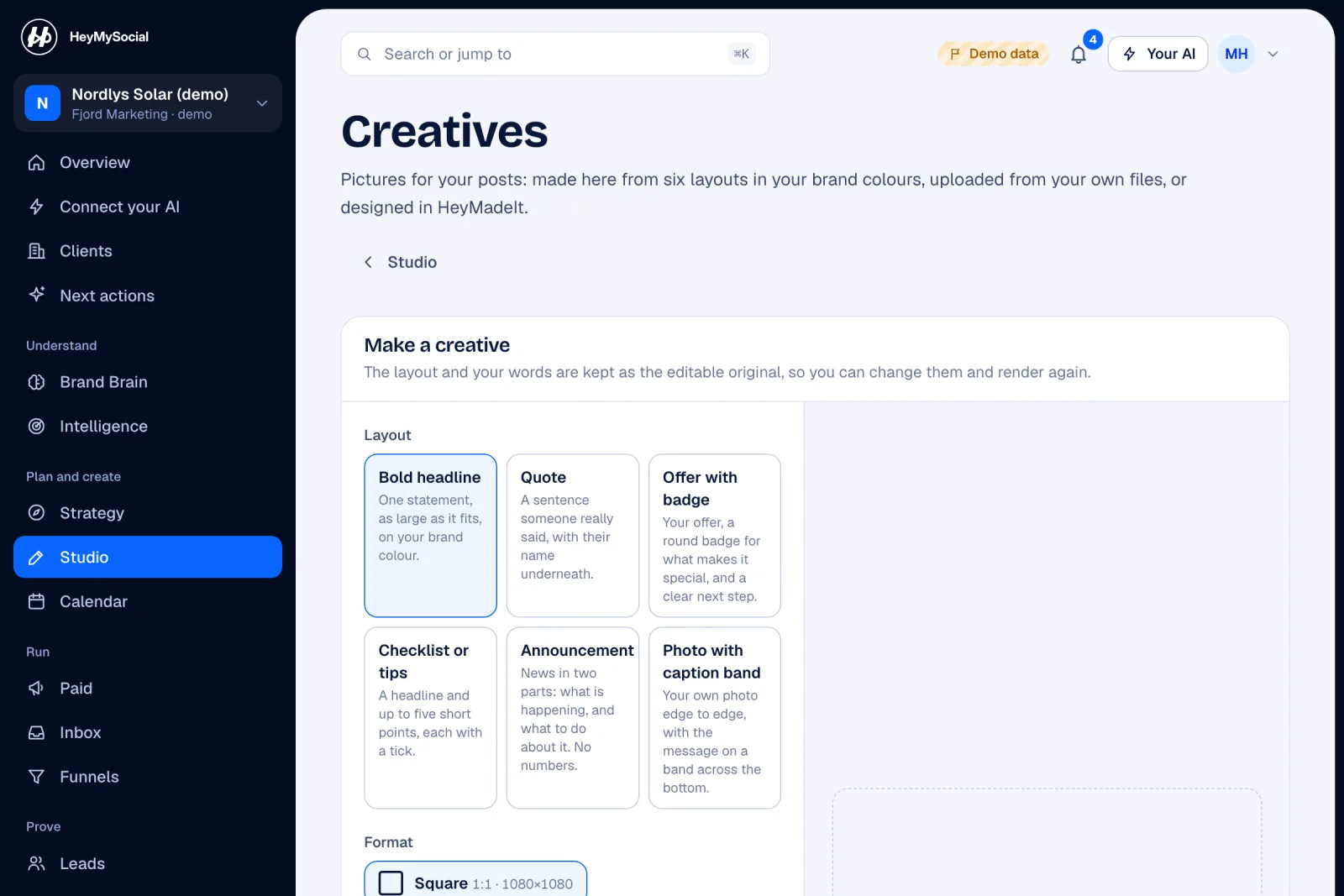
Six layouts
Each one shows only the text fields it uses.
Bold headline
One statement, as large as it fits, on your brand colour, with an optional supporting line and call to action.
Quote
A sentence someone really said, with their name underneath.
Offer with badge
Your offer, a round badge with a word or two for what makes it special, and a clear next step.
Checklist or tips
A headline and up to five short points (four in the landscape format), each with a tick.
Announcement
News in two parts: what is happening, and what to do about it.
Photo with caption band
Your own photo edge to edge, with the message on a band across the bottom. Without a photo it shows a plain field in a brand colour.
Four formats
The same words can be rendered in each. A creative is one layout in one format.
| Format | Ratio | Pixels |
|---|---|---|
| Square | 1:1 | 1080 × 1080 |
| Portrait | 4:5 | 1080 × 1350 |
| Story | 9:16 | 1080 × 1920 |
| Landscape | 16:9 | 1920 × 1080 |
A graphic from the designer is stored as an SVG file, and the service also keeps a PNG copy for channels that need one.
The text fits, and it stays readable
Long text is wrapped and shrunk to fit. An over-long word is broken, and very long text is cut with an ellipsis. Nothing is drawn outside the canvas, in any layout or format.
The colours come from the brand profile (its approved version, once it has one), and the text colour on each background is chosen by a contrast check. A live preview shows the result as you type; it is saved only when you press "Render and save".
The layout and your words are kept as the editable original. Open a creative later, change a word and render again.
- A raster logo from the brand profile is placed on the graphic. With an SVG logo, the business name is shown instead.
- A photo placed in a layout is re-encoded first and embedded as plain pixels, never as an SVG file.
- Each render counts against the plan's monthly renders: 60 on Solo, 250 on Business.
Or bring your own pictures and videos
"Upload your own" takes PNG, JPEG, WebP and GIF images and MP4 and MOV videos. The type is checked from the file itself, not from its name.
Files are private to the workspace. They are shown to its signed-in members, and to a client only for a post that client may see.
When your assistant needs files from your computer, it gives you a link to an upload page inside HeyMySocial. The link belongs to that workspace, needs you to be signed in and stops working after an hour.
Run it from your own assistantWhat your assistant can do with creatives
It picks a layout with list_creative_templates, renders with create_creative and gets the picture back, so it can look at the result before it shows you. preview_creative shows a design in another format without using a render.
create_creative
Create a creative
get_approval
Get an approval
get_content
Get one content item
import_images
Import images from links
list_approvals
List approvals
list_content
List content
list_creative_templates
List creative templates
list_creatives
List creatives
list_uploads
See what was uploaded
manage_content
Duplicate, cancel, delete or restore content
preview_creative
Look at a creative
preview_post
Preview a post
request_approval
Ask a person to approve content
request_upload
Ask the person to upload files
save_content_draft
Save a content draft
update_creative
Change a creative and render it again
What is there today
Questions about the designer
Is this a full design editor?
Can I change the colours for one graphic?
What happens when I re-render a creative that is on an approved post?
Does it generate images with AI?
What about HeyMadeIt?
Keep reading
Make the first graphic from your own headline
Set your brand colours in Brand Brain, open Creatives from the Studio, and type one statement. The trial includes 100 renders.